The fully offline AI workspace for Mac

Works with the internet unplugged

The AI that never
asks to see your files.

Transcribe, ask your documents, translate, speak and clean up files — on your Mac, with the Wi-Fi off, on purpose.
No cloud. No account. No one reading over your shoulder.

macOS 14+ · Apple Silicon · 16 GB RAM recommended

Unplug the cable. It still works.

Even on a plane, inside a courthouse network or in a secure meeting room with the Wi-Fi killed at the wall, LocalScribe runs exactly as well as it does at your desk. Your data physically cannot leave this Mac.

Most "AI tools" mean the same words with a different promise: your material is copied, uploaded, processed somewhere you cannot inspect, and retained under a policy you did not read. We took that path out. Not encrypted, not anonymised, not "deleted after processing" — never sent.

  • ⚖️  Client files stay inside the firm
  • 🩺  Patient notes never reach a data centre
  • 📰  A source’s name appears nowhere but your disk

Everything the work actually consists of.

One workspace, eleven families of capability — all on your own hardware.

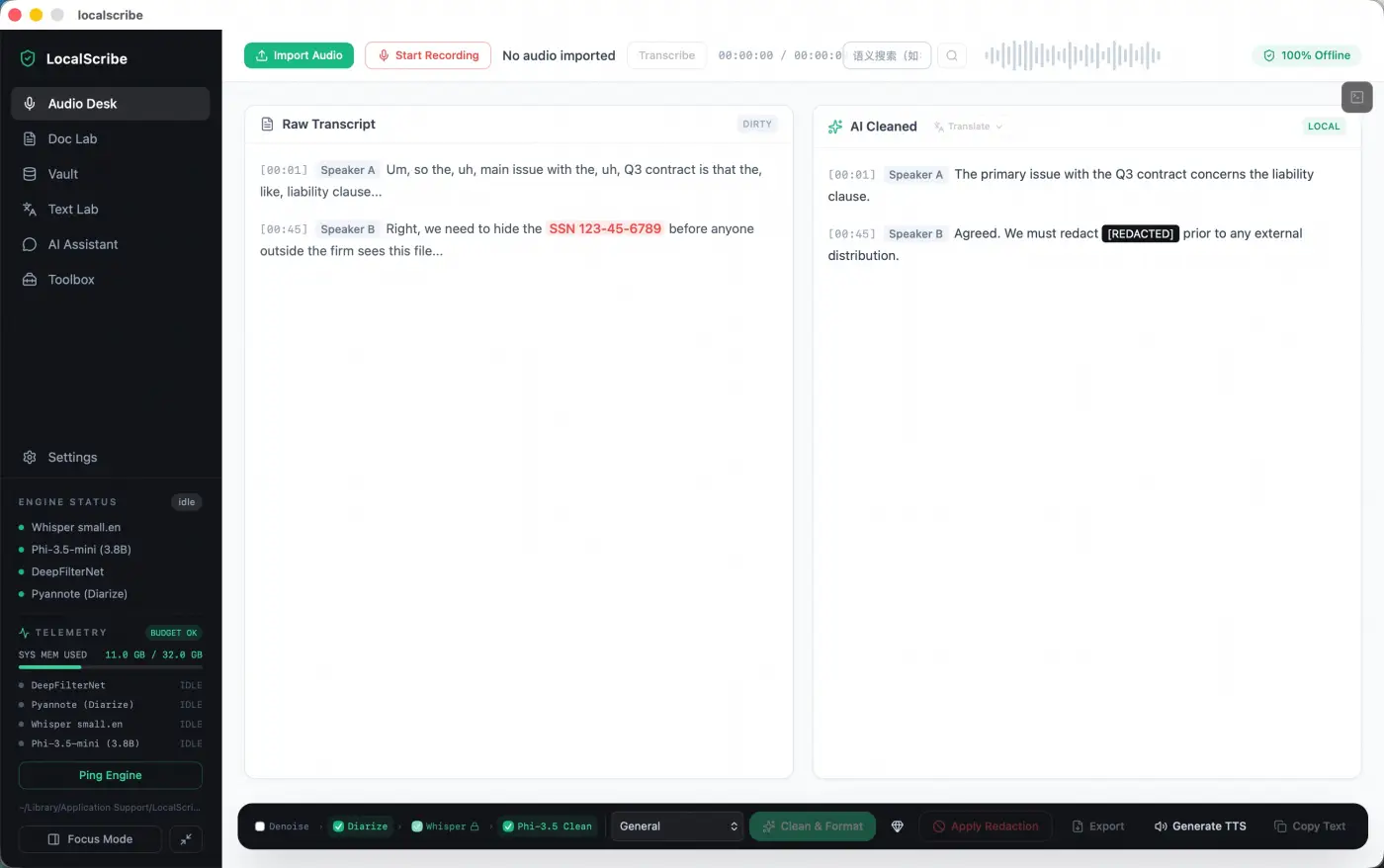
Meetings in, minutes out.

Real-time recording levels

A three-hour call with two accents and one bad line comes out as a clean document — who said what, in order, with timestamps. The “um”, the keyboard clatter and the background chatter are gone before you open the file.

  • ✓Noise-proof: background chatter is removed before the first word is written
  • ✓Automatic speaker labels, merged into readable turns
  • ✓A cleaned draft, not a raw dump — industry vocabulary kept
  • ✓Live recording feedback: level meter and silence alert while you speak
  • ✓One click blanks phone numbers, ID and card numbers, dates and email addresses
LocalScribe — Meetings in, minutes out

Ask your whole case file.

Drop in fifty documents and ask one question. The answer cites the file and the page it came from — so you can verify it in seconds instead of skimming all afternoon.

  • ✓Every answer shows its source: file name and page number
  • ✓Your library is indexed on your disk, not on a server

The paperwork workbench.

10 operations

Convert, lock, unlock, shrink and sign — without uploading a single page to a stranger’s server.

  • Convert to Word
  • Image to Word
  • Remove Watermark
  • Remove Watermark (Image)
  • Encrypt PDF
  • Decrypt PDF
  • Merge PDFs
  • Split PDF
  • Compress
  • Add Signature

Every scan, editable again.

Photograph a stapled, stamped, watermarked page and get text you can read, search and edit — then clean it up and export it to Word in the same window.

A second brain with no cloud.

100% offline

Draft, summarise and brainstorm in a plain chat that never leaves your machine. There is no server to leak, because there is no server.

Read and be read.

7 languages

Translate between seven languages with the Wi-Fi off — contracts, notes, whole reports. The text never touches the internet on its way between tongues.

Have it read to you.

54 voices · 8 languages

Turn any document into natural speech and listen on the move — proof-read with your ears, not your eyes. Everything is synthesised locally.

A workbench of everyday tools.

37 built-in + DIY

Thirty-seven ready utilities — encoders, converters, extractors, generators — plus DIY: describe a tool once, the AI builds it, and it runs locally forever after.

Watch the silicon work.

Tech Mode

A live panel shows CPU, GPU and memory while models run — proof that the work is happening on your chip, not in someone’s data centre. Turn it off when you don’t want it.

Two Macs. No card to start.

Run the full application free for 7 days, activate by pasting a key, and keep working offline forever. One licence covers two Macs and moves with you.

  • ✓7-day trial, every feature unlocked
  • ✓Offline activation — paste once, never again
  • ✓One licence, two devices
See plans and start free
⚙️ Under the hoodtechnical specifications, for the sceptics — and you should be one+

Everything above is a claim. This is the receipt: the engines, the formats and the exact reason the app can run dark. No magic — a lot of carefully chosen, open-source, on-device code.

Engines — all on-device

Transcription
Whisper large-v3-turbo (q8_0) — multilingual, language auto-detected
AI cleanup · Q&A · chat · translation
Qwen3-4B Instruct 2507 — optional swap: Phi-3.5-mini (3.8B)
Denoise
DeepFilterNet
Diarization
Pyannote
Text to speech
Kokoro-82M — 54 voices / 8 languages
OCR
Apple Vision framework (on-device)

Architecture

Compute
100% on-device — Apple Metal + CoreML acceleration
Network
Nothing you open, type or export leaves the Mac; models download on demand and subscriptions send one small licence ping every 7 days
Storage
Models live in ~/Library/Application Support/LocalScribe
Memory
Model tasks pre-check ≈8 GB of free memory and refuse to start below it
Silicon
Apple Silicon (M1 or later) · macOS 14 Sonoma+
Shell
Tauri 2 + Rust core, React UI — no Electron, no bundled Chromium
Retrieval
ONNX embeddings on CoreML + a local vector index over your own document set
Licensing
ES256 (ECDSA P-256) JWT verified offline against a built-in public key; on Lifetime, activation is the only network call

Pipeline, per stage

● DenoiseDeepFilterNet3, 48 kHz float32

● Diarizepyannote voiceprints profiled on the cleaned audio, before the words

● Transcribewhisper.cpp · Metal · large-v3-turbo q8_0 · speaker labels merged in

● Clean & formatllama.cpp · GGUF Q4_K_M · glossary-constrained

● IndexCoreML embeddings → local vector store, built in the background

● Exportdocx / md / txt / pdf, from the raw or the cleaned transcript

System requirements

  • ▸Chip: Apple Silicon (M1 or later)
  • ▸macOS: 14 Sonoma or later
  • ▸Memory: 16 GB recommended · 8 GB runs transcription & document tools
  • ▸Disk: ~7 GB for the app plus local AI models

Prefer to verify rather than read? Watch the network with Little Snitch or LuLu, or run the whole app inside a firewall-blocked profile. Both are the intended way to use it.
Questions people actually ask

Is my data really never uploaded?+

Correct — not "never", but "cannot be": there is no path in the product that puts your documents on a network. No account, no analytics, no sync, no crash reporter carrying file contents. Don’t take our word for it: unplug the Ethernet cable or switch Wi-Fi off, then transcribe, ask questions, redact and export. It keeps working. Open Little Snitch or LuLu while you do it and you will see nothing try to connect.

How does the licence work — do you phone home?+

Two answers, by plan. Lifetime: you activate once by pasting a key inside the app, and it stays offline for good — the key is verified locally against a built-in public key, no heartbeat, no periodic re-check. A server outage on our side cannot stop you from working or take the licence away. Monthly and Yearly are subscriptions: the app checks in briefly every 7 days, with a 14-day grace window when you are offline longer — and neither check ever contains your documents.

Will my Mac handle it?+

It is built for Apple Silicon from the first line, so the work runs on the chips your Mac already has instead of on a distant GPU. Transcription and rewriting are quiet on thermals — you can run it on the lap of a laptop and the fan stays where it is. 16 GB of RAM is comfortable; 8 GB still runs the transcription and document tools. Check the exact requirements under "Under the hood" below.

I work on privileged material. What can you see of my work?+

Nothing at all — and that is a design constraint, not a promise. We have no copy of your files, no telemetry stream to collect them from, and no admin panel showing active documents. When a client, a bar association or a hospital asks who else touched the material, the answer is: nobody, provably.

Can I try it before paying?+

Yes — and without a card. The first launch starts a 7-day full trial automatically: every feature unlocked, full-size local models included. When it ends, the app steps down to free mode: what you already have stays open and searchable and still exports to text or Markdown, but the tools that produce new content go quiet — transcription, OCR, translation, speech, chat, and Word or PDF export. Details on the pricing page.

What if I need to move to another Mac?+

One licence activates on two Macs; each activation records that machine, and there is no deactivation button to press. Moving to a third means sending us a line at support@localscribe.pro — we release one machine and you activate again. Your documents are ordinary files on your own disk, so they move with your disk, not with our permission.

Try it on tomorrow’s meeting.

Install it, switch the Wi-Fi off, and see what an AI assistant feels like when it has no idea who you are.

macOS 14+ · Apple Silicon · 16 GB RAM recommended · pricing